

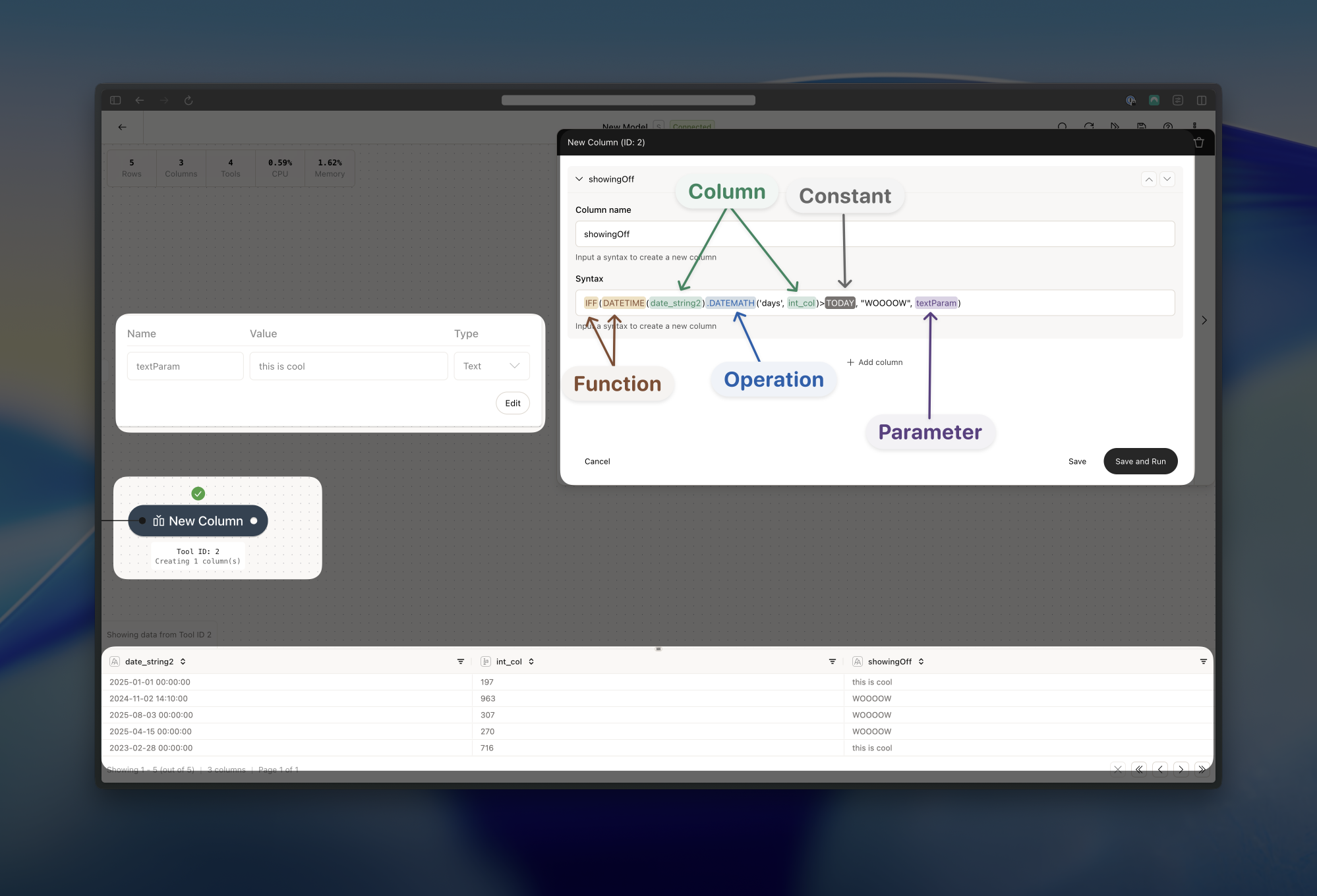
Using function, operators, constants, parameters and column referencing in a single syntax statement. The current date is 2025-09-29 (i.e. TODAY constant).
- We have an IFF function that wraps a number of other statements.
- For the when part of the IFF function, we first transform the date_string2 column to a datetime format using the DATETIME function
- Still in the when part, we add the a number of days to our transformed date_string2 column using the DATEMATH operation and the int_col column (we add the value of the int_col column as days to the date_string2 column)
- We then compare it to a TODAY constant
- If it’s greater than today, then we return the “WOOOOW” as a text literal (then part)
- If it’s not greater than today, we return the value of the textParam parameter - “this is cool” (else part)
Where can I use Syntax?
You can use syntax in a number of different tools. Note that some tools only support parameters and/or column referencing. The most common tools for Syntax is the New Column, IF Column and Filter tools. These are all the supported tools:- Directory: only Parameters in the “table name pattern” field
- Save: only Parameters in the “table name” field
- Filter
- Replace: in the “value” field
- Add Business Days: only column references in the “column name” field
- Date Math: in the “number of units” field
- IF Column
- New Column
- Row ID: only column references in the “column name” field
- API: only to reference columns in the “URL” and “body” fields
- Validate: only in the “message” field
What’s the difference between functions, operators and constants?
Functions are used around a column, a literal, a parameter or other expressions. They look like this:FUNCTION(column/literal/parameter/expression).
Operations on the other hand are “attached” to a column, a literal, a parameter or other expressions. They look like this: column/literal/parameter/expression.OPERATOR(someConfig). Notice the dot between the expression and the operator.
Lastly, Constants are used to represent a fixed value. They look like this: TODAY or NULL.