You can use the Save Table tool to store tables inside Less. You need to input a table name and choose whether to overwrite or append the potentially existing table.
If you want to send data outside of Less, you can use the Destination tool.
It is most common to overwrite tables. This will overwrite the existing table with the new table data every time the Save Table tool runs. If you choose to append the table, you will add all the new rows to the existing table. Over time there’s a risk that you will create very large tables - use this option with caution.

Where does the table get stored?

You table is stored in file-storage hosted by Less. This is a fast and efficient way to store tables inside Less that we opt for because its optimized for data analytics. If you’re an Enterprise customer, you can choose to self-host the file-storage. Reach out to us if you want to learn more about this.

Advanced options

Tables names are not unique in Less. Each tables has a unique identifier. That means that if you want to append to a table, that is generated by another model, then you need to specify the exact table you want to overwrite or append to. You can do that with the advanced options. You can select the exact table you want to overwrite or append to which will disable the table name input field.
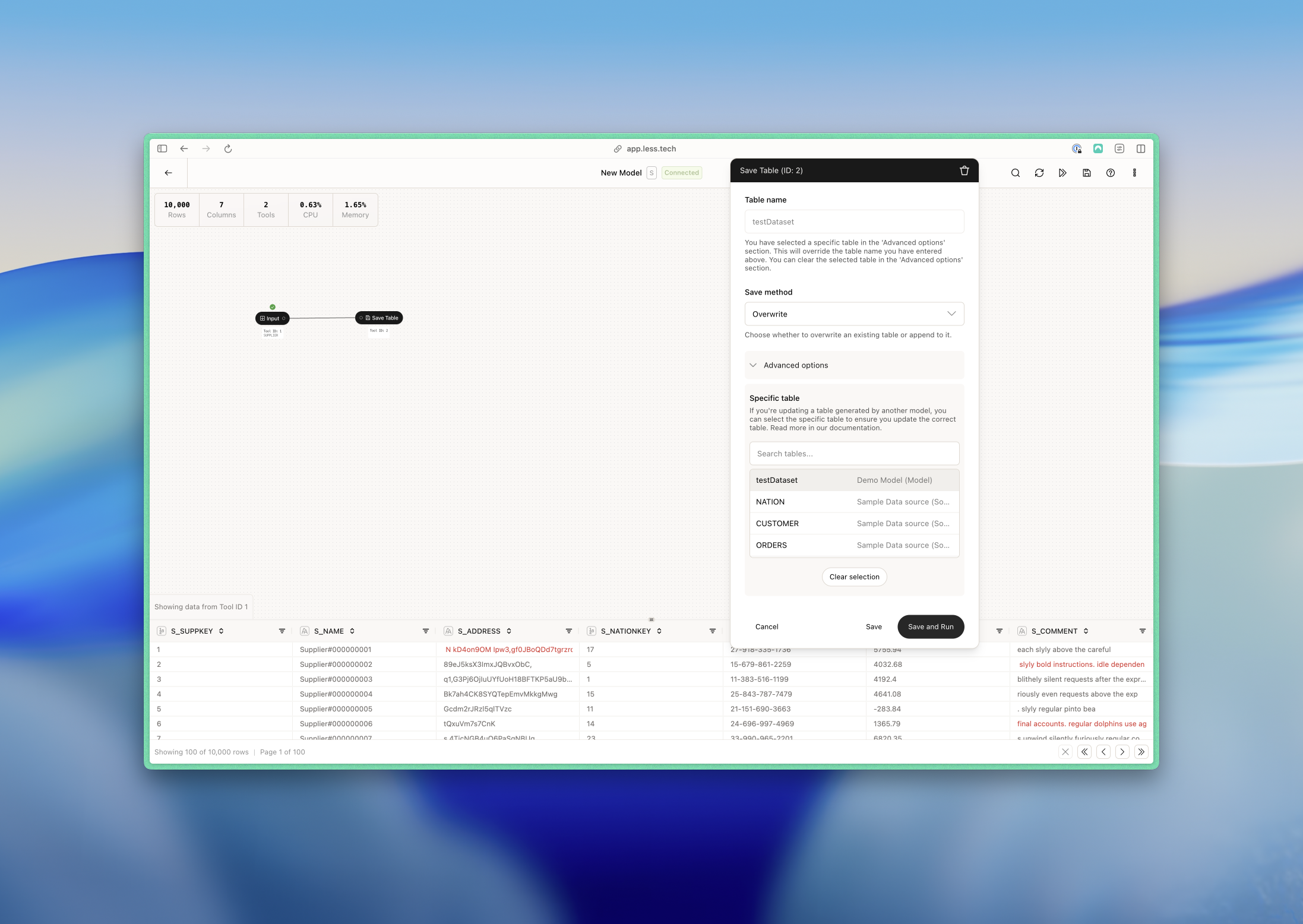
In the screenshot above, you can see that we’re in a model called “New Model”. We want to overwrite a specific table called “testDataset” which is originally generated by a model called “Demo Model”. You do not need to make any changes to the “Demo Model”. This will ensure that “New Model” will always overwrite the same table - “testDataset” generated by “Demo Model”.