

- Users → People in your workspace
- Groups → Collections of users (like departments)
- Assets → Things to protect (folders, sources, models)
- Abilities → Specific actions like deleting a model, uploading a source, etc.
- Roles → Ability bundles (we provide some default roles, but you can create your own)
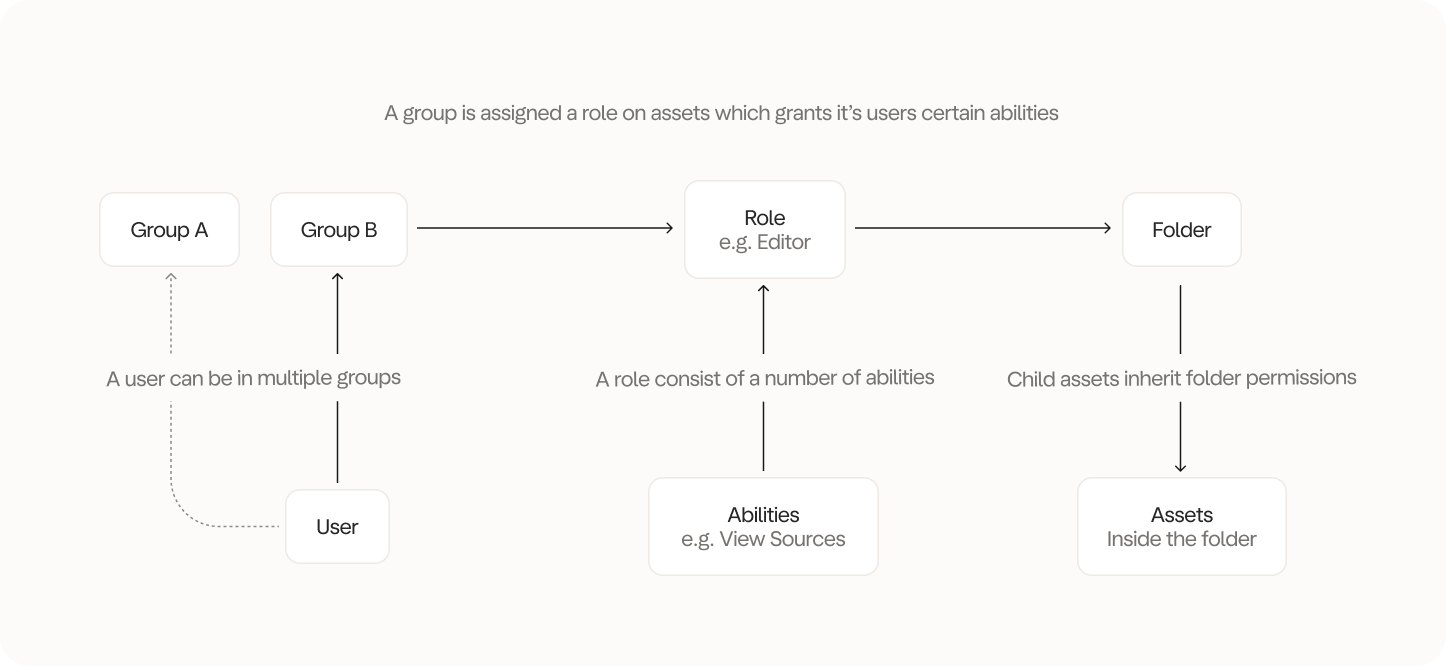
‘Why on earth did you make it so complicated?’
You’re right, it can seem a bit complicated. But it is also a bit of a pain to manage permissions if you don’t have a good structure. First of all, we don’t subscribe to the idea that its smart to assign permissions to individual users. Its much easier to assign permissions to groups of users. When a new user joins or leaves, you simply add or remove them from the group. Job done. The alternative involves manually setting permissions for each user individually on each asset, which is a pain. Secondly, Less is a data tool whereby we have to provide a great deal of control and flexibility to our users. Most software tools have roles like Viewer and Editor. However, in our case there are more nuances to account for. For example, running and publishing a models are two very different things - should they be bundled together or not in a “Editor” role? We don’t think so. That’s why we have the customisable roles and abilities. Thirdly, setting abilities individually would be a nightmare. As of writing this, we have 36 abilities. It would be horrible to have to set each one individually. That’s why we abstract it away into a bundle of abilities - a role. Lastly, why can you only set permissions on folders? Because this too would great a spaghetti mess of permissions where certain assets have custom permission in a folder but not all. It would make very opaque to understand who has access to what.Real-world example
Let’s say you have sensitive Finance data that only Finance Managers should access:- Create a group called “Finance Managers”
- Create a folder - “Sensitive Finance Data” and move all the assets generating sensitive data into the folder
- Give the “Finance Managers” group “Manager” role on the “Sensitive Finance Data” folder
- Remove all other permission settings for the “Sensitive Finance Data” folder
- Result: Only Finance Managers can see and manage that sensitive data