Skip to main contentModels helps you transform the raw data extracted from sources to clean and useful tables providing insights. Typically, Less users use the tables created by models in visualisations tools, to send emails or to automate tasks like updating a CRM system.
You can use the output of one model as the input to another model. That is generally considered best practice so you don’t end up with huge and overwhelming models. Use an orchestration to run models (and sources for that matter) in the right order.
Models are built on the Canvas - you can read much more about that here. We also recommend checking out Building My First Model which is part of our Academy.
You can create new models by navigating to a folder and clicking the Create button in the top-right corner.
Schedule a model to run automatically
You can schedule a model to run whenever you want. The first thing you have to ensure is that the model has a published version.
Then navigate to the folder with the model and click on the three dots to the right-hand side.
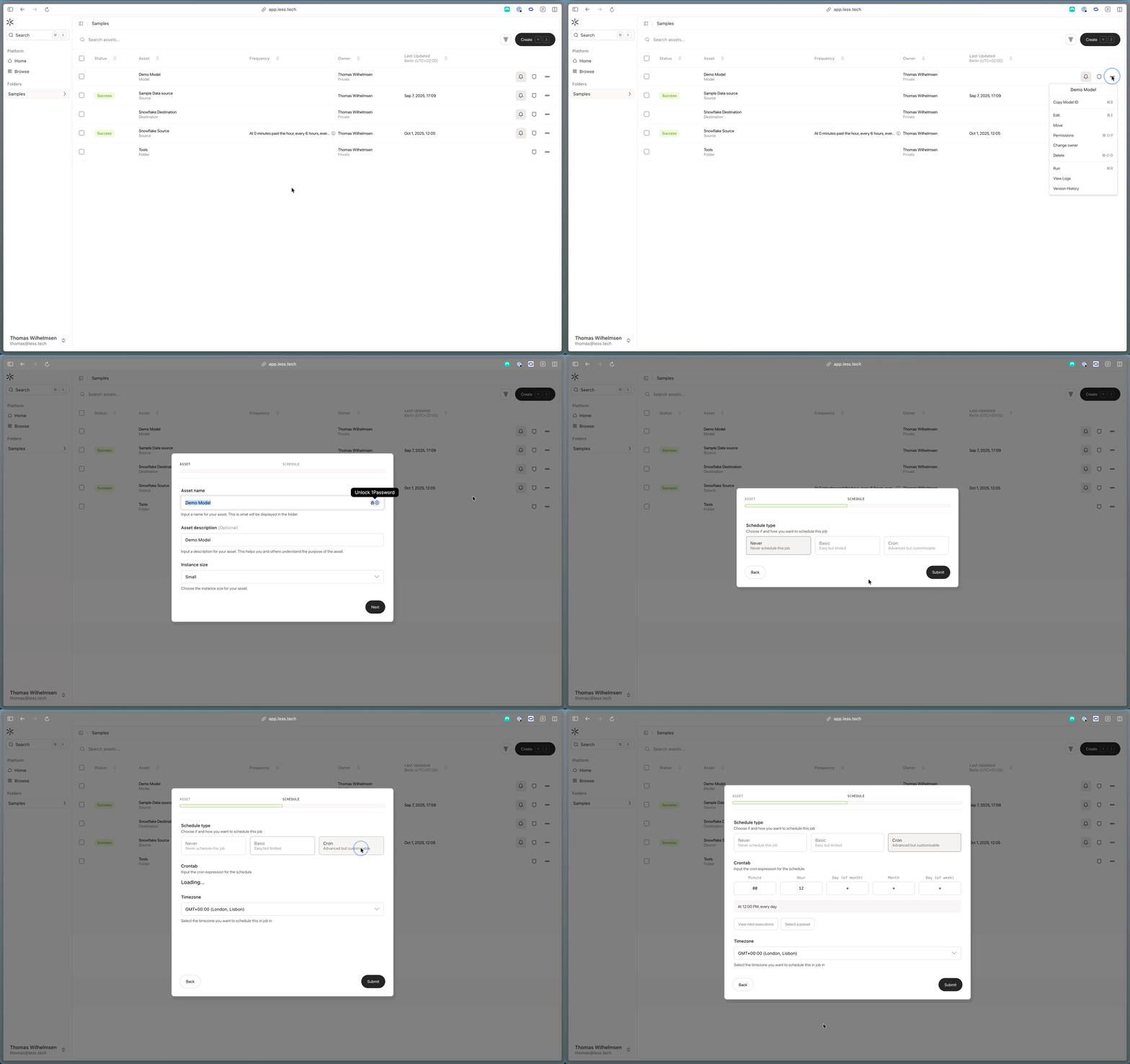
You’ll see three options: 1) never to avoid scheduling, 2) basic or 3) cron.
If you choose basic, you can select the interval (hourly, daily or weekly), the time of day, the timezone and the day of the week (only for weekly).
If you choose cron, you get full control over the schedule. Cron syntax is a powerful way to schedule your model runs. It consists of five fields:
- Minute
- Hour
- Day of month
- Month
- Day of week
For example, 0 0 * * * would run the model every day at midnight. Where 0 in minute means at the start of the hour and 0 in hour means at the start of the day (i.e. midnight). * means every minute, every hour, every day, every month, every day of the week so in this case every day of every month at midnight.
You could also choose to input 15 8-17/4 * * 1-5 to run your model at 15 minutes past the hour, every 4 hours, between 08:00 AM and 05:59 PM, Monday through Friday. In sum, you have full control.
You can choose from one of our presets and you can also view the 10 next times the model will run given your cron expression.