> ## Documentation Index
> Fetch the complete documentation index at: https://docs.less.tech/llms.txt
> Use this file to discover all available pages before exploring further.
# Parameter
> A variable store for reusable values
Think of the Parameter tool as a *store* that holds one or multiple values you can use over and over again throughout your model. It can be very helpful to ensure consistency, flexibility, and organization in your model.
### Example
In the short video below, you can see that we created a Parameter called *numericValue* with a value of 100 (initially).
We then **reference** the *numericValue* in a [New Column](../new-columns/new-column) tool to multiply our *simple\_int* column with the value of the *numericValue* parameter.
Initially, we get a value of 100, 200, 300, etc. But if we change the value of the *numericValue* parameter to 500, we get a value of 500, 1000, 1500, etc.
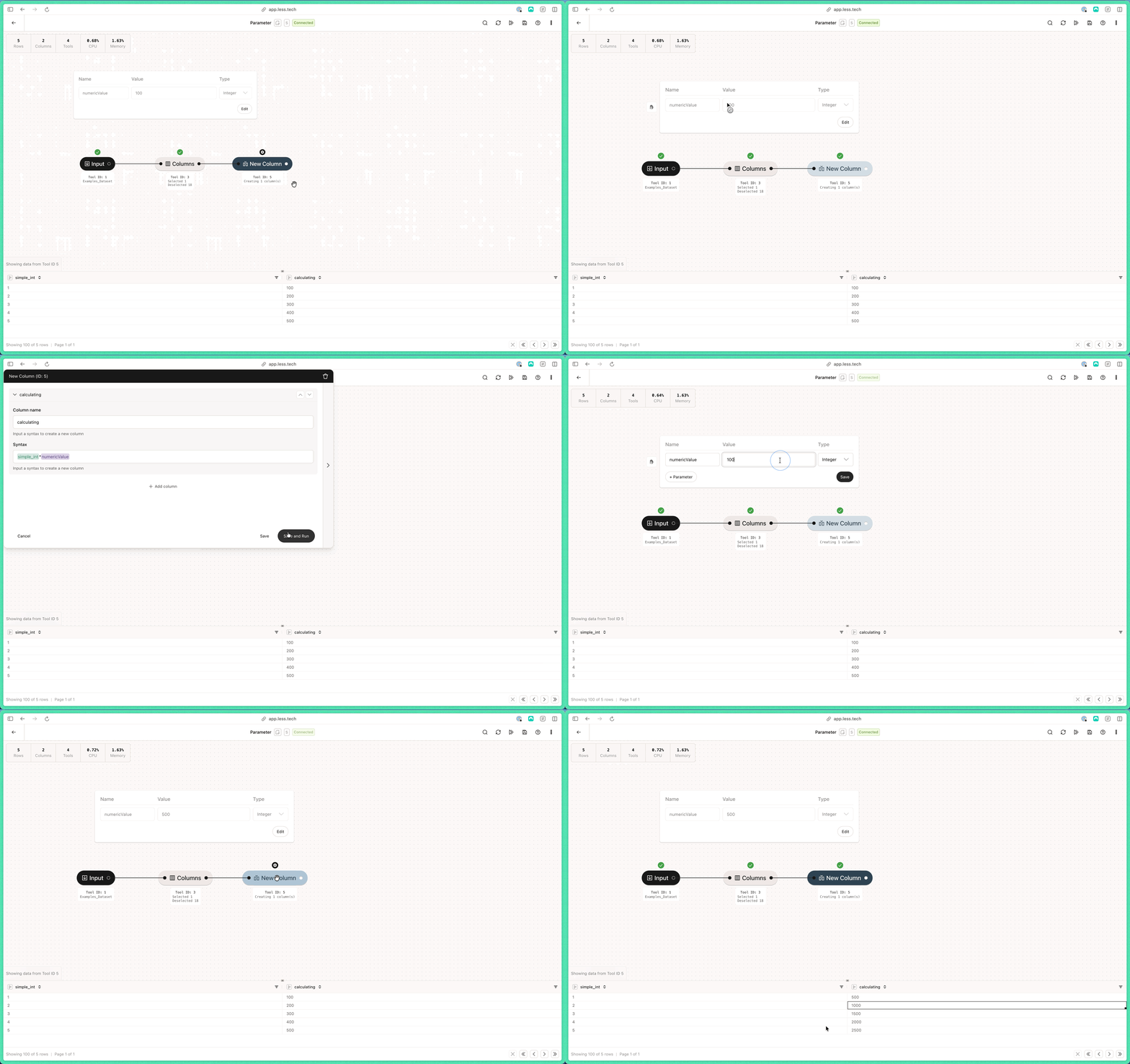 You could have used the *numericValue* parameter in a 100 different tools. Changing it would then update all the values in the tools that reference it.
We recommend that you read more about [Parameters](/canvas/parameters) in the Canvas documentation.
You could have used the *numericValue* parameter in a 100 different tools. Changing it would then update all the values in the tools that reference it.
We recommend that you read more about [Parameters](/canvas/parameters) in the Canvas documentation.