> ## Documentation Index
> Fetch the complete documentation index at: https://docs.less.tech/llms.txt
> Use this file to discover all available pages before exploring further.
# Compare
> Move values vertically
The Compare tool can be used to move cell values up or down in your dataset. It helps you look at the previous or subsequent rows relative to your current row. You can think of it as looking back (up in the dataset) or forward (down in the dataset) to see what happened before or later in your dataset. It is typically used after sorting by a column (oftentimes a date column).
The Compare tool is similar to a LAG function in SQL. If you're looking for more advanced ways to do row-wise calculations check out the [Cumulative](/tools/new-columns/cumulative), [Running Interval](/tools/new-columns/running-interval) or [Loop](/tools/utilities/loop) tool
### Configuration
The Compare tool has of two required input and one optional input.
Add a prefix to your output columns.
Select the column(s) that contains the values you would like to move vertically in your dataset
Input the number of rows backward/up or forward/down that you want to fetch data from relative to your current row. Note that to look forward/down you need to input a negative value.
This is an optional input. You can use it to segregate what you are comparing with into groups. It means you're moving rows within a group defined by the values of the column(s) you select here.
This configuration is similar to a PARTITION in SQL
### Example: Getting the previous row inside a group
In this example, we want to get the previous row (lookback = 1) inside a group - our *bool\_col* column.
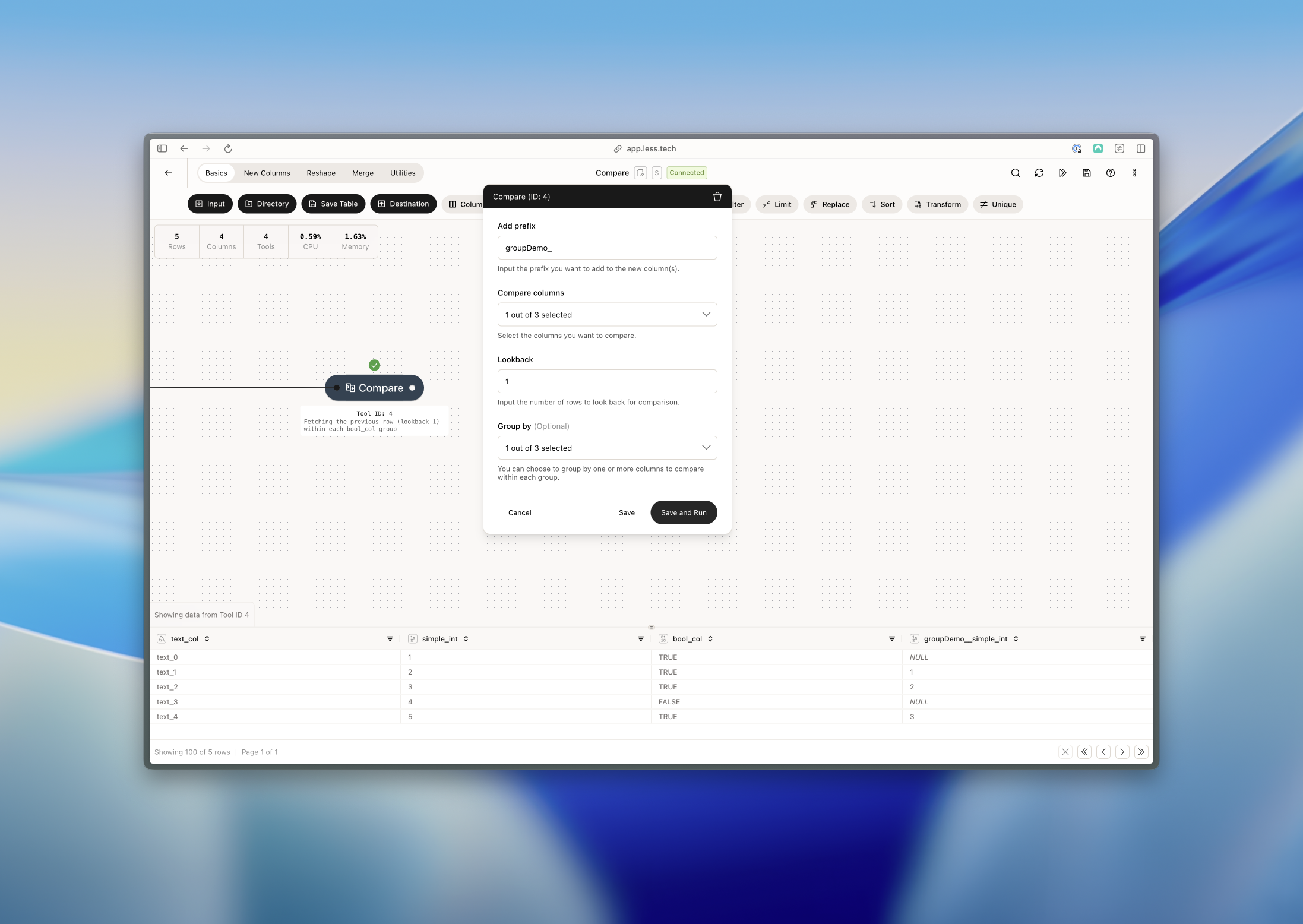 Notice that the 1st and 4th row are null. The is because there is no previous row for the 1st row and the 4th row. The 4th row is null because there is no previous row inside the *bool\_col* which on the 4th row is FALSE - as opposed to TRUE for the other rows.
The value of the *gorupDemo\_simple\_int* for row 2 is then 1 because 1 is the value of the *simple\_int* column on row 1 and because both are within the same group (TRUE in *bool\_col*).
Notice that the 1st and 4th row are null. The is because there is no previous row for the 1st row and the 4th row. The 4th row is null because there is no previous row inside the *bool\_col* which on the 4th row is FALSE - as opposed to TRUE for the other rows.
The value of the *gorupDemo\_simple\_int* for row 2 is then 1 because 1 is the value of the *simple\_int* column on row 1 and because both are within the same group (TRUE in *bool\_col*).