> ## Documentation Index
> Fetch the complete documentation index at: https://docs.less.tech/llms.txt
> Use this file to discover all available pages before exploring further.
# Orchestrate
> Run models and sources in sequence
The orchestrate functionality helps you run models and sources in a specific sequence. This is useful if you want to run a model after a source has been run or if you want to run a model after another model has been run.
We recommend switching off individual schedules for models and sources when using an orchestrate to avoid double runs.
You can create new orchestrates by navigating to a folder and clicking the *Create* button in the top-right corner.
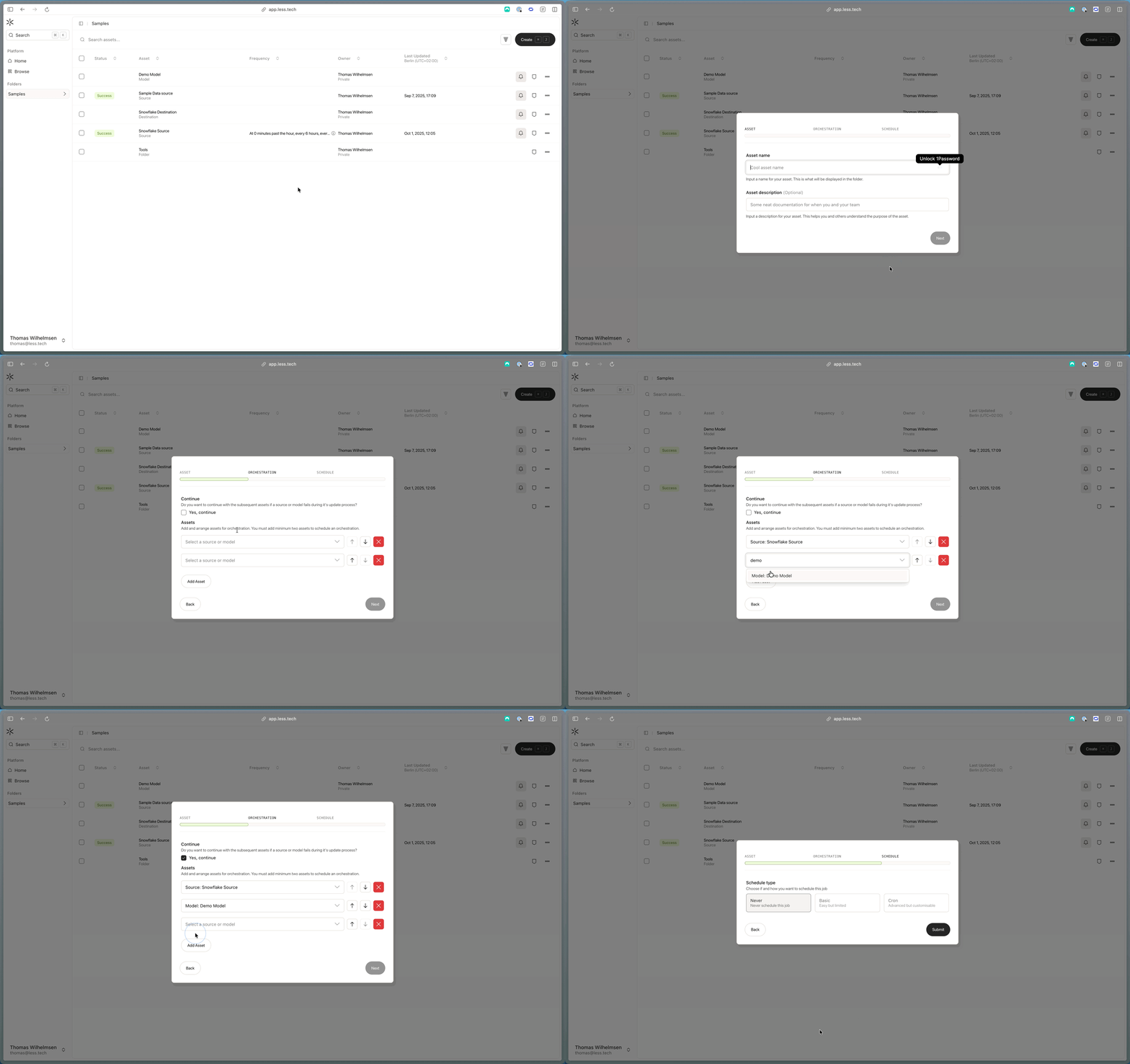 You can add as many models and sources that you want. The sources/models run in the order from the top to the bottom. You can delete and reorder the order with the buttons to the right.
You can also choose if you **want to continue running the orchestrate if a model or source fails**. Simple check the box and the orchestrate will continue running the next models and sources without stopping.
You can add as many models and sources that you want. The sources/models run in the order from the top to the bottom. You can delete and reorder the order with the buttons to the right.
You can also choose if you **want to continue running the orchestrate if a model or source fails**. Simple check the box and the orchestrate will continue running the next models and sources without stopping.