> ## Documentation Index
> Fetch the complete documentation index at: https://docs.less.tech/llms.txt
> Use this file to discover all available pages before exploring further.
# Introduction
> Supercharge your tool configuration
Syntax is a combination of a couple of different things: constants, operations, functions, parameters and column referencing. It can be be used to chain transformations inside a number of different tools. It generally helps reduce the number of tools you need to use.
All syntax functions and operations are also available as standalone tools in the Canvas.
Syntaxing enables you to do cool things like the following:
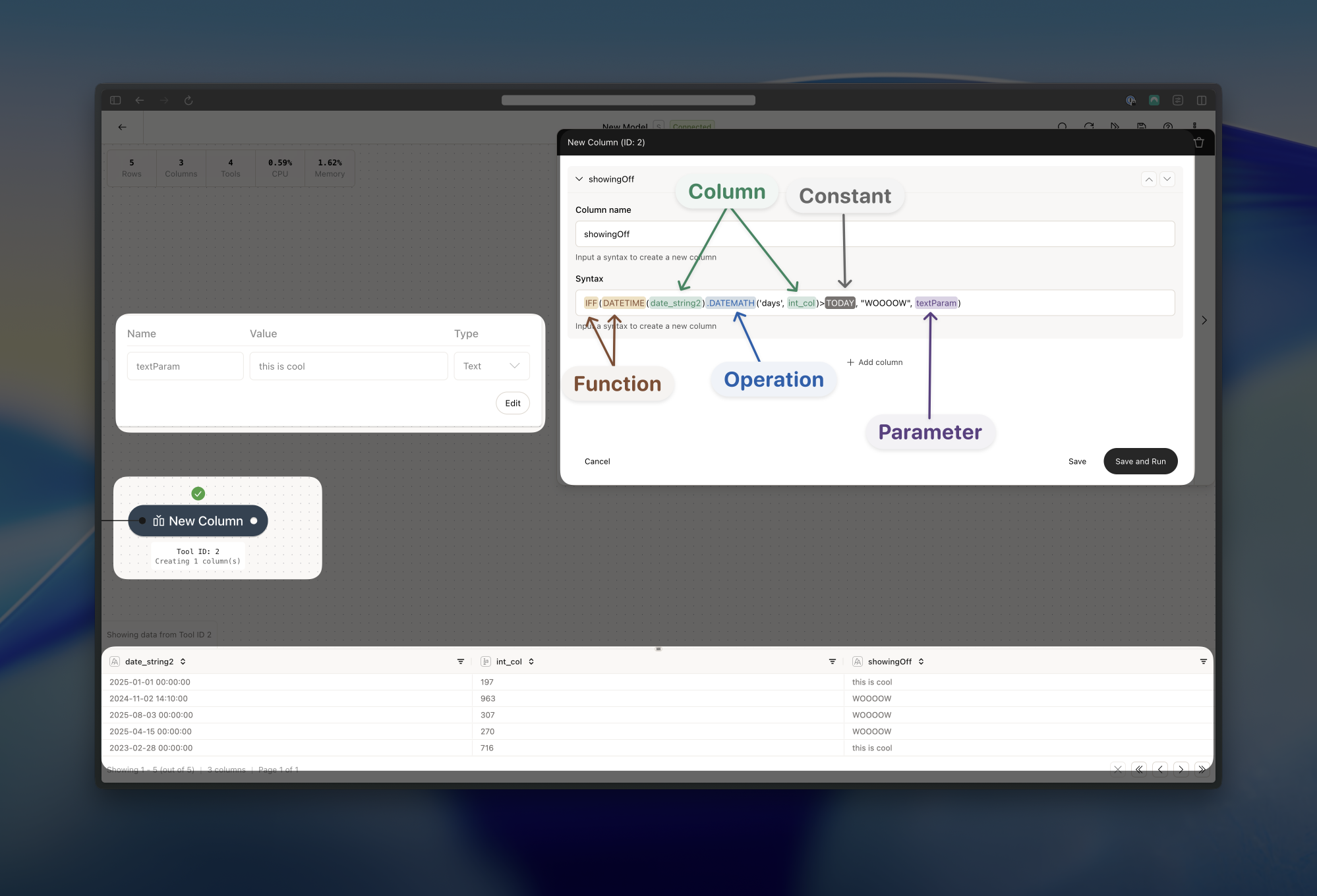 Here we do a number of things:
1. We have an IFF function that wraps a number of other statements.
2. For the *when* part of the IFF function, we first transform the *date\_string2* column to a datetime format using the DATETIME function
3. Still in the *when* part, we add the a number of days to our transformed *date\_string2* column using the DATEMATH operation and the *int\_col* column (we add the value of the *int\_col* column as days to the *date\_string2* column)
4. We then compare it to a TODAY constant
5. If it's greater than today, then we return the "WOOOOW" as a text literal (*then* part)
6. If it's not greater than today, we return the value of the textParam parameter - "this is cool" (*else* part)
### Where can I use Syntax?
You can use syntax in a number of different tools. Note that some tools only support parameters and/or column referencing. The most common tools for Syntax is the [New Column](/tools/new-columns/new-column), [IF Column](/tools/new-columns/if-column) and [Filter](/tools/basics/filter) tools. These are all the supported tools:
* [Directory](/tools/basics/directory): only Parameters in the "table name pattern" field
* [Save](/tools/basics/save-table): only Parameters in the "table name" field
* [Filter](/tools/basics/filter)
* [Replace](/tools/basics/replace): in the "value" field
* [Add Business Days](/tools/basics/save-table): only column references in the "column name" field
* [Date Math](/tools/new-columns/date-math): in the "number of units" field
* [IF Column](/tools/new-columns/if-column)
* [New Column](/tools/new-columns/new-column)
* [Row ID](/tools/new-columns/row-id): only column references in the "column name" field
* [API](/tools/utilities/api): only to reference columns in the "URL" and "body" fields
* [Validate](/tools/utilities/validate): only in the "message" field
### What's the difference between functions, operators and constants?
[Functions](/canvas/syntax-functions) are used around a column, a literal, a parameter or other expressions. They look like this: `FUNCTION(column/literal/parameter/expression)`.
[Operations](/canvas/syntax-operations) on the other hand are "attached" to a column, a literal, a parameter or other expressions. They look like this: `column/literal/parameter/expression.OPERATOR(someConfig)`. Notice the dot between the expression and the operator.
Lastly, [Constants](/canvas/syntax-constants) are used to represent a fixed value. They look like this: `TODAY` or `NULL`.
Here we do a number of things:
1. We have an IFF function that wraps a number of other statements.
2. For the *when* part of the IFF function, we first transform the *date\_string2* column to a datetime format using the DATETIME function
3. Still in the *when* part, we add the a number of days to our transformed *date\_string2* column using the DATEMATH operation and the *int\_col* column (we add the value of the *int\_col* column as days to the *date\_string2* column)
4. We then compare it to a TODAY constant
5. If it's greater than today, then we return the "WOOOOW" as a text literal (*then* part)
6. If it's not greater than today, we return the value of the textParam parameter - "this is cool" (*else* part)
### Where can I use Syntax?
You can use syntax in a number of different tools. Note that some tools only support parameters and/or column referencing. The most common tools for Syntax is the [New Column](/tools/new-columns/new-column), [IF Column](/tools/new-columns/if-column) and [Filter](/tools/basics/filter) tools. These are all the supported tools:
* [Directory](/tools/basics/directory): only Parameters in the "table name pattern" field
* [Save](/tools/basics/save-table): only Parameters in the "table name" field
* [Filter](/tools/basics/filter)
* [Replace](/tools/basics/replace): in the "value" field
* [Add Business Days](/tools/basics/save-table): only column references in the "column name" field
* [Date Math](/tools/new-columns/date-math): in the "number of units" field
* [IF Column](/tools/new-columns/if-column)
* [New Column](/tools/new-columns/new-column)
* [Row ID](/tools/new-columns/row-id): only column references in the "column name" field
* [API](/tools/utilities/api): only to reference columns in the "URL" and "body" fields
* [Validate](/tools/utilities/validate): only in the "message" field
### What's the difference between functions, operators and constants?
[Functions](/canvas/syntax-functions) are used around a column, a literal, a parameter or other expressions. They look like this: `FUNCTION(column/literal/parameter/expression)`.
[Operations](/canvas/syntax-operations) on the other hand are "attached" to a column, a literal, a parameter or other expressions. They look like this: `column/literal/parameter/expression.OPERATOR(someConfig)`. Notice the dot between the expression and the operator.
Lastly, [Constants](/canvas/syntax-constants) are used to represent a fixed value. They look like this: `TODAY` or `NULL`.