> ## Documentation Index
> Fetch the complete documentation index at: https://docs.less.tech/llms.txt
> Use this file to discover all available pages before exploring further.
# IF all ELSE fails
IF statements - or conditional statements - are a very powerful ways to create new columns. They allow you to set up a bunch of rules that you can use to create new columns. Like the example below.
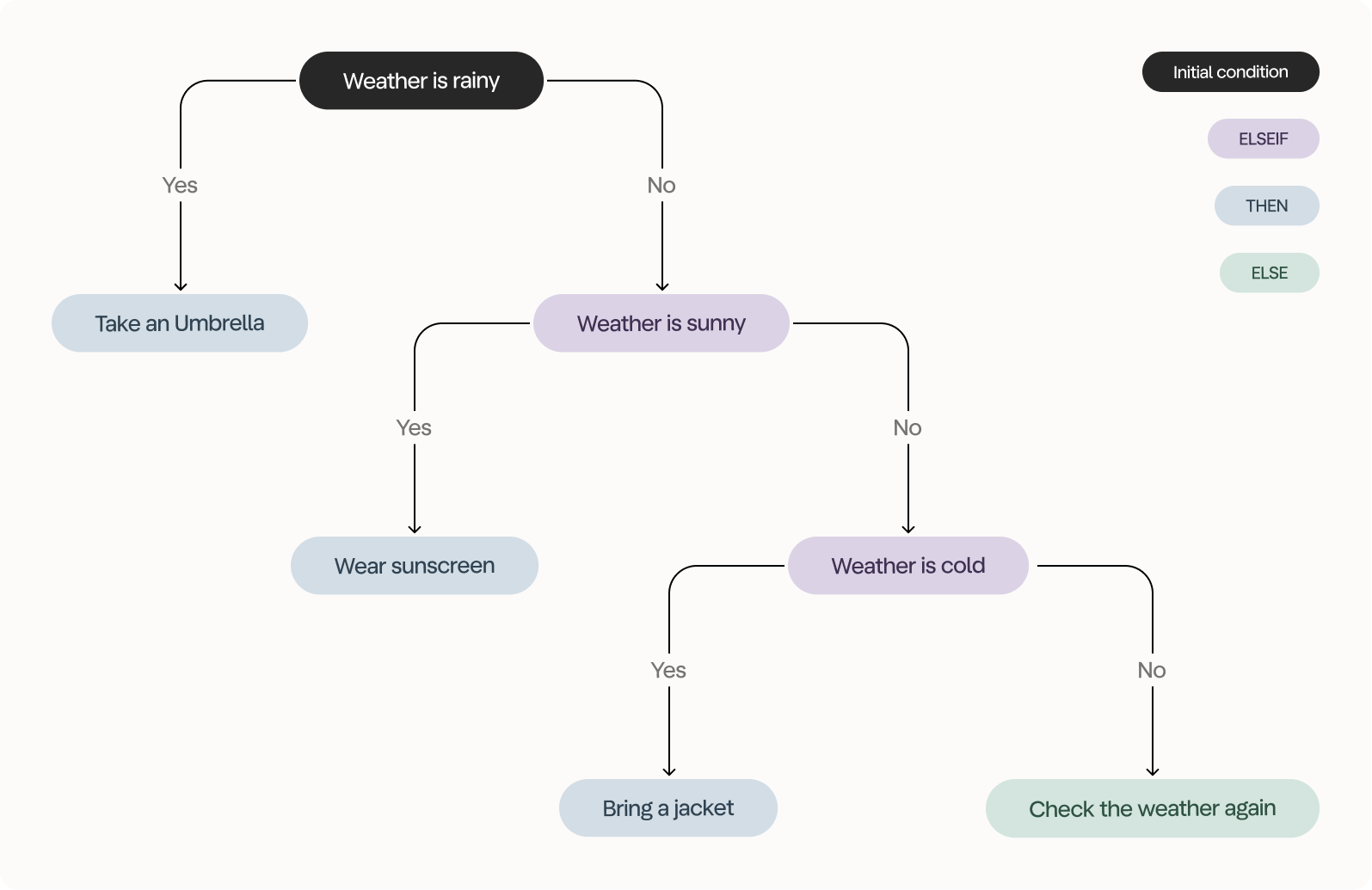 In Less, we create these using the [IF Column](/tools/new-columns/if-column) tool - which is exactly what this lesson is about.
## Exercise
We're working with the *ORDERS* dataset and you want to get the result shown below. We ended up with 282 rows and used eight tools to get the result.
In Less, we create these using the [IF Column](/tools/new-columns/if-column) tool - which is exactly what this lesson is about.
## Exercise
We're working with the *ORDERS* dataset and you want to get the result shown below. We ended up with 282 rows and used eight tools to get the result.
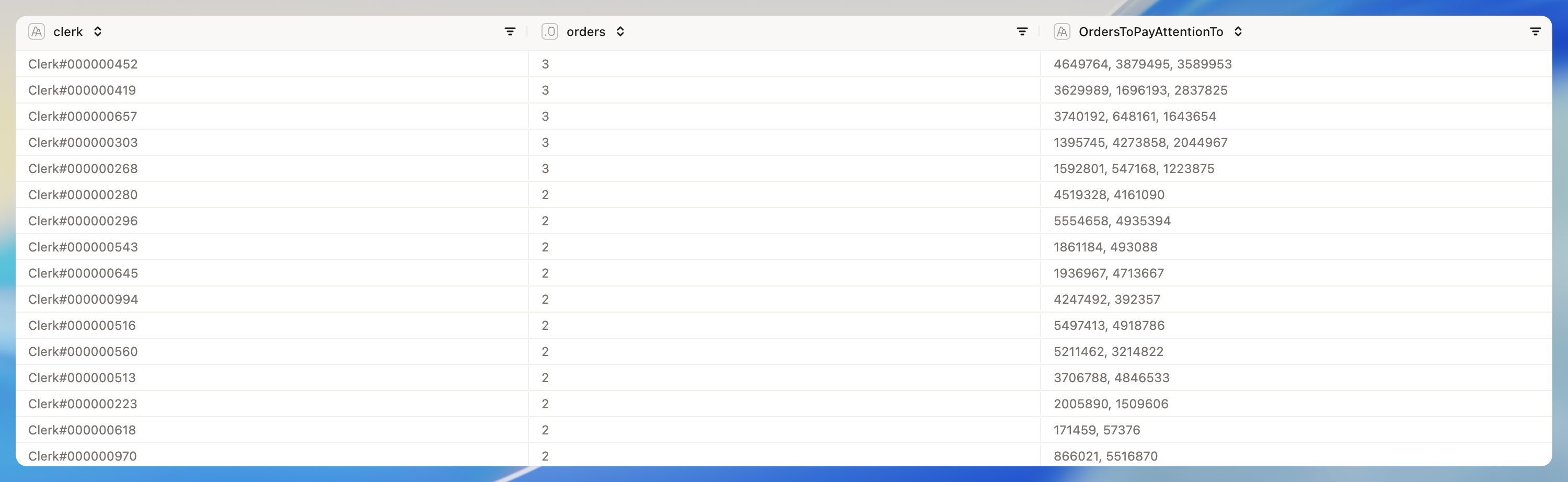 We're trying to understand which of our clerks have orders that demand immediate attention. We want to give them this dataset so they'll know what to focus on.
Some notes:
1. On your way to the results, you should create two new columns using the [IF Column](/tools/new-columns/if-column) tool.
2. The first column should take the order status - which is abbreviated to a single letter - and convert it to a full word. O for Ordered, F for Fulfilled and P for Processed.
3. The second column should determine order urgency - either High, Medium or Low. Orders with a total price above 400.000 should be High, orders with a total price higher than 200.000 should be Medium and all others should be Low.
4. We are only interested in orders with a high value (the column we just created), with urgent priority (*O\_ORDERPRIORITY* column) that are ordered (the other column we just created).
5. When it comes to the *OrdersToPayAttentionTo* column, the concatenate aggregation method for Text columns in the [Group By](/tools/reshape/group-by) tool is your friend.
6. We want the data to be sorted by the number of orders to pay attention to, descending.
### Solution
We're trying to understand which of our clerks have orders that demand immediate attention. We want to give them this dataset so they'll know what to focus on.
Some notes:
1. On your way to the results, you should create two new columns using the [IF Column](/tools/new-columns/if-column) tool.
2. The first column should take the order status - which is abbreviated to a single letter - and convert it to a full word. O for Ordered, F for Fulfilled and P for Processed.
3. The second column should determine order urgency - either High, Medium or Low. Orders with a total price above 400.000 should be High, orders with a total price higher than 200.000 should be Medium and all others should be Low.
4. We are only interested in orders with a high value (the column we just created), with urgent priority (*O\_ORDERPRIORITY* column) that are ordered (the other column we just created).
5. When it comes to the *OrdersToPayAttentionTo* column, the concatenate aggregation method for Text columns in the [Group By](/tools/reshape/group-by) tool is your friend.
6. We want the data to be sorted by the number of orders to pay attention to, descending.
### Solution